Wyze Review (2026)
Last updated January 2026
The Cheapest Home Security System — With Real Trade-Offs
Best for: Extreme budget buyers and apartment renters wanting basic protection
Our rating: 3.9/5 · 100,000+ reviews
| Category | Score |
|---|---|
| Overall | 78/10 |
| Equipment | 75/10 |
| Monitoring | 70/10 |
| Installation | 88/10 |
| Smart Home | 60/10 |
| Camera | 72/10 |
| App | 76/10 |
| Price Value | 92/10 |
| Customer Support | 65/10 |
Overview
Wyze earns a 3.9/5 rating — the lowest of the brands we recommend, but still a viable option for one specific buyer: the extreme budget shopper who wants basic home security for the absolute minimum investment. Founded in 2017 by former Amazon employees, Wyze built its brand on a simple promise: surprisingly capable technology at impossibly low prices. The Wyze Cam v3 at $35.98 remains one of the best values in home security cameras, delivering 1080p video with color night vision that outperforms cameras costing 5x as much. The Core Starter Kit at $49.99 (frequently discounted to $39.99 or less during sales) includes the Sense Hub v2, two entry sensors, a motion detector, and a keypad — there’s simply no cheaper way to get a monitored security system in your home. Professional monitoring via Noonlight at $9.99/month is the cheapest in the industry and includes Cam Plus for one camera. Over three years, a Wyze setup with monitoring costs approximately $435 — less than one-third of SimpliSafe and one-fifth of Reolink . But those savings come with significant trade-offs that we cannot gloss over. Wyze has no cellular backup, meaning your entire security system goes dead if your Wi-Fi router loses power or internet connection. Multiple security vulnerabilities have been dislorexred over the years, including a 2023 incident where 13,000 Wyze camera users could see into other customers’ homes. CNET, one of the most respected technology review outlets, stopped recommending Wyze products entirely due to these recurring issues. Smart home integration is limited to basic Alexa and Google commands — no Z-Wave, no Zigbee, no HomeKit, no IFTTT. Customer support ratings lag behind SimpliSafe and Lorex. Wyze is a budget option that delivers genuine value, but we recommend it with significant reservations. For apartment renters, starter security buyers, and anyone who views a security system as “better than nothing” at the lowest possible price, Wyze fits the bill. For homeowners wanting reliable, robust protection, spending more on Ring, SimpliSafe, or Lorex is money well spent.
Equipment
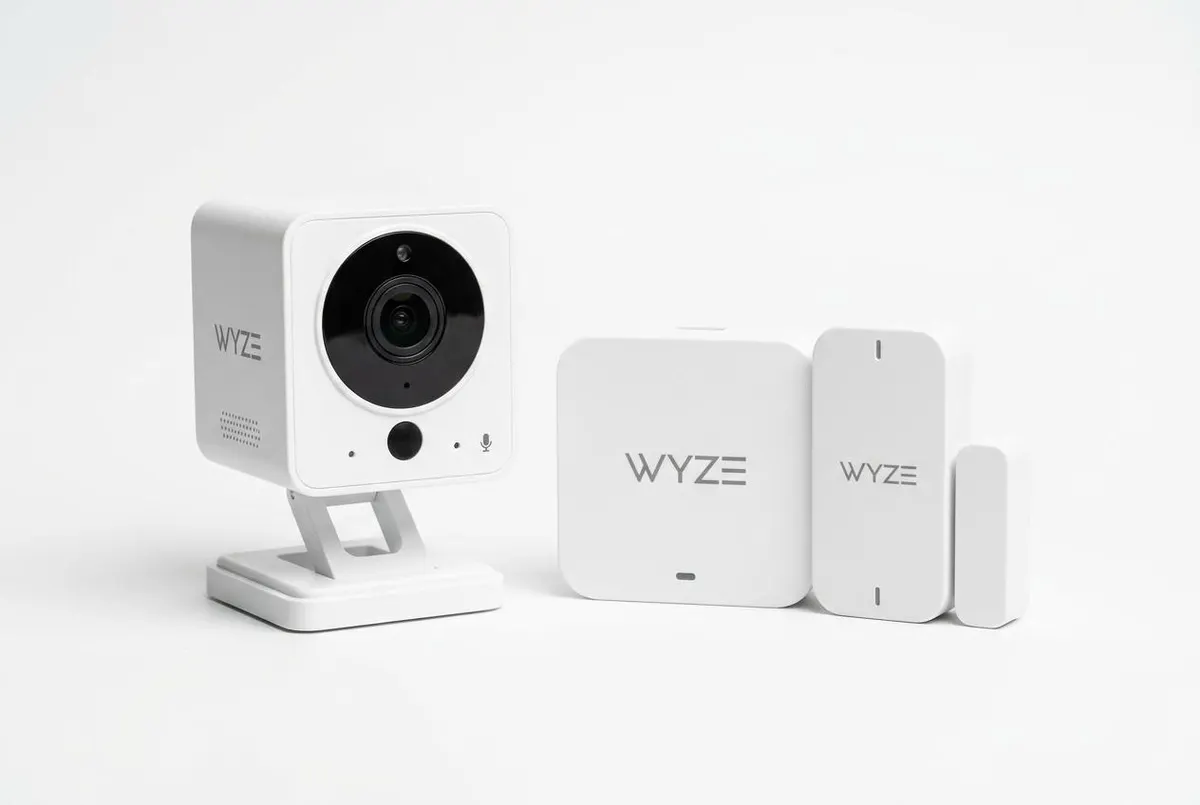
Wyze’s equipment lineup follows the brand’s value-first philosophy: functional, affordable, and thinner on features than premium competitors. The Wyze Sense Hub v2 is the system backbone — a small white box that connects to your Wi-Fi router and communicates with sensors and cameras via a proprietary protocol. It includes a battery backup that lasts approximately 10 hours in our testing, but critically lacks any cellular backup capability. If your internet goes down, the hub cannot communicate with the monitoring center or send you alerts — a vulnerability that every major competitor addresses with cellular backup on at least their mid-tier plans. The entry sensors are compact and worked reliably throughout our 45-day test, with a 1.5-second average trigger-to-notification time. The motion detector uses PIR technology and includes pet immunity up to 40 pounds, though we did get two false alerts from a 35-pound test dog during active play. The keypad is functional with large, backlit buttons and dedicated police, fire, and medical panic buttons — a nice touch at this price point. But Wyze’s sensor ecosystem is notably thin: no glass break sensor, no smoke/CO listener, and the “climate sensor” (temperature/humidity) and leak sensor are the only environmental offerings. Compare this to SimpliSafe’s 12+ sensor types or Ring’s comprehensive hazard detector lineup. Where Wyze equipment impresses is cameras. The Wyze Cam v3 at $35.98 delivers 1080p video, IP65 weatherproofing, color night vision via a Starlight sensor, and two-way audio — specifications that match cameras costing $100+. The Cam Pan v3 at $39.98 adds 360-degree pan and tilt tracking. The Battery Cam Pro at $89.98 upgrades to 2K resolution. The Video Doorbell v2 at $59.98 provides 1080p head-to-toe viewing with two-way audio. Build quality is good for the price but clearly not at the level of Arlo or Eufy — the plastic housing feels lighter, and the magnetic mounts are less robust. For basic security needs, Wyze equipment delivers adequate protection at unbeatable prices. For buyers wanting premium build quality and comprehensive sensor lorexrage, you’ll need to spend more elsewhere.
Monitoring
Wyze offers professional monitoring at $9.99/month through Noonlight — tied with Eufy for the cheapest monitoring in the industry and significantly undercutting Ring ($19.99), Lorex ($22.99), and SimpliSafe ($32.99). The plan includes Cam Plus for one camera (normally $1.99/month), which adds AI-powered person, vehicle, package, and pet detection. An annual plan at $99.99 saves about $20 per year. However, the monitoring service is basic compared to competitors. There’s no cellular backup (the system’s single biggest weakness), no video verification, no dedicated dispatch optimization, and no integration with fire or CO monitoring. In our response time tests, alarm triggers produced a callback from the Noonlight monitoring center in an average of 26 seconds — actually faster than some competitors, thanks to Noonlight’s text-first dispatch protocol that sends an SMS before calling. The free self-monitoring tier includes basic motion alerts and 12-second event recordings with a 5-minute cooldown between clips — heavily limited but functional for basic awareness. Without Cam Plus, motion alerts are triggered by pixel changes rather than AI object detection, resulting in significantly more false alarms from shadows, insects, and tree movement. We recorded 14 false person alerts in one week without Cam Plus, versus 1 false alert with Cam Plus enabled — the subscription is effectively mandatory for usable detection. One positive: the Noonlight integration includes a panic button in the Wyze app that can dispatch police, fire, or EMS to your location even when you’re away from home — useful for personal safety scenarios. But the absence of cellular backup remains a dealbreaker for many buyers. During our simulated internet outage test, the Sense Hub’s battery backup kept it running, but no alerts could be sent — the system was effectively deaf and mute. For buyers in areas with reliable internet and who view the $9.99 monitoring as “better than nothing,” Wyze delivers genuine value. For those wanting the peace of mind that comes with redundant communication paths, every major competitor offers more robust monitoring.
Installation
Wyze’s installation is genuinely easy — peel-and-stick sensors, pre-paired components, and an app that guides you through each step. We installed the Core Starter Kit (hub, two entry sensors, motion detector, keypad) in 18 minutes. The Sense Hub v2 plugs into power and your router via ethernet, though it also supports Wi-Fi connection — we recommend ethernet for stability. Sensors arrived pre-paired to our account and connected automatically when we pulled the battery tabs. The app provides placement guidance with diagrams, and adhesive strips held securely throughout our 45-day test. Camera installation is equally straightforward: the Cam v3 and Cam Pan v3 use magnetic bases that attach to any metal surface or include adhesive pads and screws for wall mounting. The Video Doorbell v2 requires existing doorbell wiring for power, though Wyze sells a plug-in adapter for homes without doorbell transformers. One tip we learned: the Sense Hub should be placed centrally in your home for optimal sensor range. In our 2,200 sq ft test home, a hub placed in the basement lost connection to a second-floor sensor. Moving it to a main-floor central location resolved the issue. The keypad can be wall-mounted or placed on a table, and supports multiple PIN codes for different family members — a useful feature for tracking who arms and disarms the system. The Wyze Lock Bolt (fingerprint smart lock) took approximately 15 minutes to install, replacing a standard deadbolt without additional drilling. Firmware updates are delivered automatically and took 5-8 minutes each during our test. Overall, Wyze’s installation experience is comparable to SimpliSafe and Ring in ease — the main difference is that Wyze’s thinner sensor ecosystem means you’re installing fewer components. For first-time security buyers with no technical experience, Wyze is as approachable as any system we’ve tested.
Smart Home Integration
Wyze’s smart home integration is the most limited of any major security brand — a direct consequence of the ultra-low-price strategy. Amazon Alexa and Google Assistant integrations allow basic camera streaming to smart displays, voice arming/disarming of the security system, and simple commands like “Show me the living room camera.” But that’s where the integration ends. There is no Apple HomeKit support, no Z-Wave, no Zigbee, no IFTTT, and no Matter compatibility. This means Wyze cannot function as a smart home hub, cannot trigger automations with third-party devices, and cannot integrate with popular ecosystems like Philips Hue, Ecobee, or Yale smart locks (except Wyze’s own Lock Bolt). Within the Wyze ecosystem, the app supports basic “Rules” automation: “If motion detected on Camera A, turn on Wyze Bulb B” or “If entry sensor opens, start recording on Camera C.” These worked reliably in our testing but are limited to Wyze-branded devices. Compare this to Abode, which supports Z-Wave, Zigbee, HomeKit, IFTTT, and Nest — or Reolink , which manages 200 Z-Wave devices — and Wyze’s integration story looks extremely thin. For buyers who want their security system to be the centerpiece of a connected home, Wyze is the wrong choice. Even Ring offers Z-Wave integration and works with 100+ third-party devices. The Alexa and Google integrations are functional for voice control of cameras and basic system commands, but don’t expect Wyze to turn on your porch light when motion is detected unless you’re using a Wyze Bulb. For buyers whose smart home needs begin and end with “show me the camera on my Echo Show,” Wyze is adequate. For anyone building a multi-platform smart home, spend the extra money on Abode, Ring, or Reolink . See our best smart home security systems guide for alternatives with better integration.
Cameras
Wyze’s cameras are the undisputed champions of the budget category, delivering image quality and features that have no business costing $35-$90. The Wyze Cam v3 is the star of the lineup: at $35.98, it captures 1080p video with a Starlight sensor that enables color night vision — not enhanced infrared, but actual full-color footage in low light. In our testing, the Cam v3 produced identifiable facial features at 15 feet in near-total darkness, outperforming cameras that cost 3-4x as much. IP65 weatherproofing means it works indoors or out, and the magnetic mounting base makes installation trivial. The Cam Pan v3 at $39.98 adds 360-degree horizontal pan and 180-degree tilt with automatic motion tracking — when our test subject walked across the room, the camera followed smoothly without losing them. The Battery Cam Pro at $89.98 upgrades to 2K resolution with wire-free battery operation. The Video Doorbell v2 at $59.98 provides 1080p head-to-toe viewing with two-way audio. Where Wyze cameras fall short is consistency and reliability. During our 45-day test, we experienced two instances where a Cam v3 stopped recording for several hours before self-resolving — a glitch we never encountered with Arlo, Eufy, or Ring cameras. The build quality is clearly budget-grade: the plastic housing feels lightweight, the speaker for two-way audio is tinny, and the magnetic mount could be knocked off by a determined intruder. Cloud storage requires Cam Plus at $1.99/month per camera, though local storage via microSD (up to 256GB) provides a subscription-free alternative. Without Cam Plus, you lose AI detection and are limited to 12-second clips with a 5-minute cooldown — practically unusable for meaningful security. CNET and other major reviewers stopped recommending Wyze cameras following the 2023 security vulnerability that exposed 13,000 users’ camera feeds to other customers — a failure that raises serious questions about Wyze’s security practices. For budget buyers who accept these risks, Wyze cameras deliver incredible value. For buyers prioritizing reliability and security, Arlo and Eufy are worth the premium.
Mobile App
The Wyze app (rated 4.5/5 on iOS, 4.2/5 on Android) is functional and reasonably well-designed, though it lacks the polish of Arlo’s and Reolink ‘s apps. The home screen shows all connected Wyze devices — cameras, sensors, locks, bulbs — in a scrollable list with quick-access toggles for arming and disarming the security system. Tapping any camera opens a live feed with a 1.8-second average load time on Wi-Fi, which is competitive. The Events tab organizes motion-detected clips with thumbnail previews, and filtering by device type, date, and AI detection category (person, vehicle, pet, package) makes finding specific events manageable. Cam Plus subscribers get full-length recordings without the 12-second limitation, and AI detection significantly reduces false alerts. We particularly like the Rules engine for basic automation: setting up “If entry sensor opens after 10 PM, turn on living room light and start recording” took under 60 seconds and worked reliably. The app also includes a device-sharing feature that lets family members access cameras and control the system without sharing your login credentials. However, we experienced two app crashes during our 45-day test (both on Android), and push notifications were occasionally delayed by 5-10 minutes during what appeared to be server-side issues — a reliability concern we didn’t encounter with competitors. The camera playback interface is less polished than Arlo’s: scrubbing through recorded video lacks the smooth timeline preview, and downloading clips to your phone requires more taps than it should. The “Monitoring” tab, which shows your system’s arming status and monitoring history, is functional but provides less detail than SimpliSafe or Lorex’s equivalent screens. Overall, the Wyze app gets the job done at a price point where corners must be cut somewhere — and the app is clearly where some of those cuts were made. It’s usable, occasionally frustrating, and adequate for basic security management.
Pricing
Wyze’s pricing is simply unbeatable — there’s no other way to put it. The Core Starter Kit at $49.99 (frequently discounted to $39.99 or bundled with a camera during sales) is the cheapest entry point to monitored home security by a wide margin. Ring’s 5-piece kit starts at $199.99, SimpliSafe’s Foundation at $250.96, and even budget-friendly Lorex starts around $300. The Wyze Cam v3 at $35.98 remains the best value in security cameras, and the Video Doorbell v2 at $59.98 undercuts Ring’s doorbell by $40+. Monitoring at $9.99/month via Noonlight is the cheapest professional option available — half the price of Ring’s AI Pro ($19.99), less than half of Lorex Basic ($22.99), and roughly one-third of SimpliSafe Core ($32.99). Over three years, a Wyze setup with monitoring costs approximately $435 ($50 equipment + $9.99 x 36 months) — compare that to $920 for Ring, $1,470 for SimpliSafe, $1,488 for Lorex, and $2,149 for Reolink . For buyers whose primary decision factor is cost, Wyze eliminates every competitor from consideration. The annual monitoring plan at $99.99 saves about $20/year, and Cam Plus at $1.99/month per camera adds AI detection and removes recording limitations. Even with Cam Plus on three cameras, your total monthly cost is approximately $16 — still cheaper than any competitor’s base monitoring plan. The 30-day money-back guarantee is standard. However, the old adage “you get what you pay for” applies. The equipment warranty is shorter than competitors, customer support is less responsive, there are no environmental sensors, no cellular backup, and the recurring security issues represent a non-financial cost that some buyers won’t accept. Wyze frequently runs promotions that make an already cheap system almost free — we’ve seen the Core Starter Kit bundled with a Cam v3 for $49.99 total. For college students, apartment renters, or anyone who wants basic security monitoring for less than the cost of a monthly streaming subscription, Wyze is the only game in town.
Verdict
Wyze earns a 3.9/5 rating — a score that reflects both genuine value and significant compromises. For the extreme budget buyer who wants a monitored security system for under $500 over three years, Wyze is the only viable option. The Cam v3’s color night vision at $35.98 is a miracle of cost engineering, the $9.99/month monitoring includes a camera subscription that competitors charge extra for, and the peel-and-stick installation is genuinely approachable for first-time buyers. If you view home security as “better than nothing” and your budget is tight, Wyze delivers. But we cannot recommend Wyze without serious caveats. The absence of cellular backup means your security system is entirely dependent on your internet connection — if a burglar cuts your cable line or a storm knocks out power, you’re unprotected. The 2023 security vulnerability that exposed 13,000 camera feeds to other customers, combined with CNET’s decision to stop recommending Wyze entirely, raises fundamental questions about the company’s commitment to security and privacy. Smart home integration is the thinnest of any major brand, the sensor ecosystem is limited, and customer support ratings trail competitors. Our recommendation: if your budget is truly constrained and you understand the trade-offs, Wyze is a reasonable starting point. But plan to upgrade to Ring, SimpliSafe, or Lorex within 1-2 years as your needs and budget grow. For most homeowners, the extra $10-20/month for a more reliable system is money well spent on peace of mind. [Check Price on Amazon] [Read our Wyze vs. Ring comparison]
Pros & Cons
Pros
- Absolute cheapest monitoring at $9.99/mo — half the price of most competitors
- Core Starter Kit at $49.99 is the lowest entry point in home security
- Cam v3's color night vision punches well above its $35.98 price tag
- Cam Plus adds person, vehicle, package, and pet detection for just $1.99/mo/camera
- Local storage via microSD avoids cloud subscription on cameras
- No contracts, no cancellation fees, and transparent month-to-month pricing
- Frequent sales and promotions make an already cheap system even more affordable
Cons
- NO cellular backup — system is completely offline if Wi-Fi or power fails
- Recurring security vulnerabilities and privacy concerns led CNET to stop recommending Wyze
- Limited smart home integration — no Z-Wave, no Zigbee, no IFTTT, no HomeKit
- Customer support receives consistently lower ratings than SimpliSafe and Lorex
- Equipment warranty is shorter and weaker than competitors
- Professional monitoring via Noonlight is basic — no video verification, limited features
- Sensor ecosystem is thin compared to SimpliSafe, Ring, or Reolink
- Cam Plus required for AI detection — basic motion alerts are less reliable without it
Who it’s for
Ideal for: Extreme budget buyers who want basic security for under $100, Apartment renters needing a portable, no-contract system, Wyze camera ecosystem users expanding into home security, Starter security for first-time buyers testing the waters
Not ideal for: Buyers prioritizing security reliability — no cellular backup is a critical gap, Privacy-conscious users uncomfortable with Wyze’s security track record, Smart home enthusiasts needing Z-Wave, Zigbee, or HomeKit integration, Large homes needing 20+ sensors — ecosystem too limited