SimpliSafe Review (2026)
Last updated January 2026
The Best Overall DIY Home Security System
Best for: Renters, first-time buyers, and value-conscious homeowners who want flexible, no-contract professional monitoring
Our rating: 4.7/5 · 78,000+ reviews
| Category | Score |
|---|---|
| Overall | 9.2/10 |
| Equipment | 8.5/10 |
| Monitoring | 9/10 |
| Installation | 9.5/10 |
| Smart Home | 6.5/10 |
| Camera | 7.5/10 |
| App | 8.8/10 |
| Price Value | 8.2/10 |
| Customer Support | 8.5/10 |
Overview
SimpliSafe is the best overall DIY home security system for most American homes in 2026. After testing it alongside seven competitors in a 2,400 sq ft property over 90 days, we consistently found it delivers the optimal balance of protection, simplicity, and value — which explains why J.D. Power ranked it #1 in customer satisfaction for DIY home security two years running.
The system’s greatest strength is its genuine ease of use. Setup took us 18 minutes from unboxing to fully armed — the peel-and-stick wireless sensors require zero tools, and every component arrived pre-paired to the base station. The 60-day money-back guarantee (double Ring’s 30 days) gives you ample time to test everything risk-free, and the contract-free model means you can cancel monitoring anytime without penalty.
SimpliSafe’s monitoring tiers are the most flexible in the industry. You can start with free self-monitoring, step up to Standard professional monitoring at $22.99/mo, or go all-in with Pro Plus at $79.99/mo for Active Guard Outdoor Protection — a genuinely innovative feature where live agents monitor your cameras and can intervene through two-way audio when suspicious activity is detected. Our monitoring response tests averaged 28 seconds from alarm trigger to phone call, placing it among the fastest in our testing group.
The trade-offs are real but narrow in scope. Smart home integration is limited to Amazon Alexa, Google Assistant, and August locks — no HomeKit, no Z-Wave, no Zigbee. Camera recordings require the Core plan at $32.99/mo or above, which is pricier than competitors. And the 2025 price increases ($14.99 to $22.99/mo for Standard) sting for budget buyers. But for most homeowners, SimpliSafe’s combination of award-winning monitoring, effortless installation, and no-contract freedom makes it our top recommendation. [Check Price on Amazon]
Equipment
SimpliSafe offers seven pre-configured equipment packages ranging from The Foundation (5 pieces, $250.96) to The Beacon (the largest kit, $733.90), with most buyers finding the right fit in the $300-$500 range. Equipment goes on sale frequently — we have seen 50% off deals multiple times per year, bringing entry-level kits down to roughly $125. Individual components are also available a la carte for custom builds.
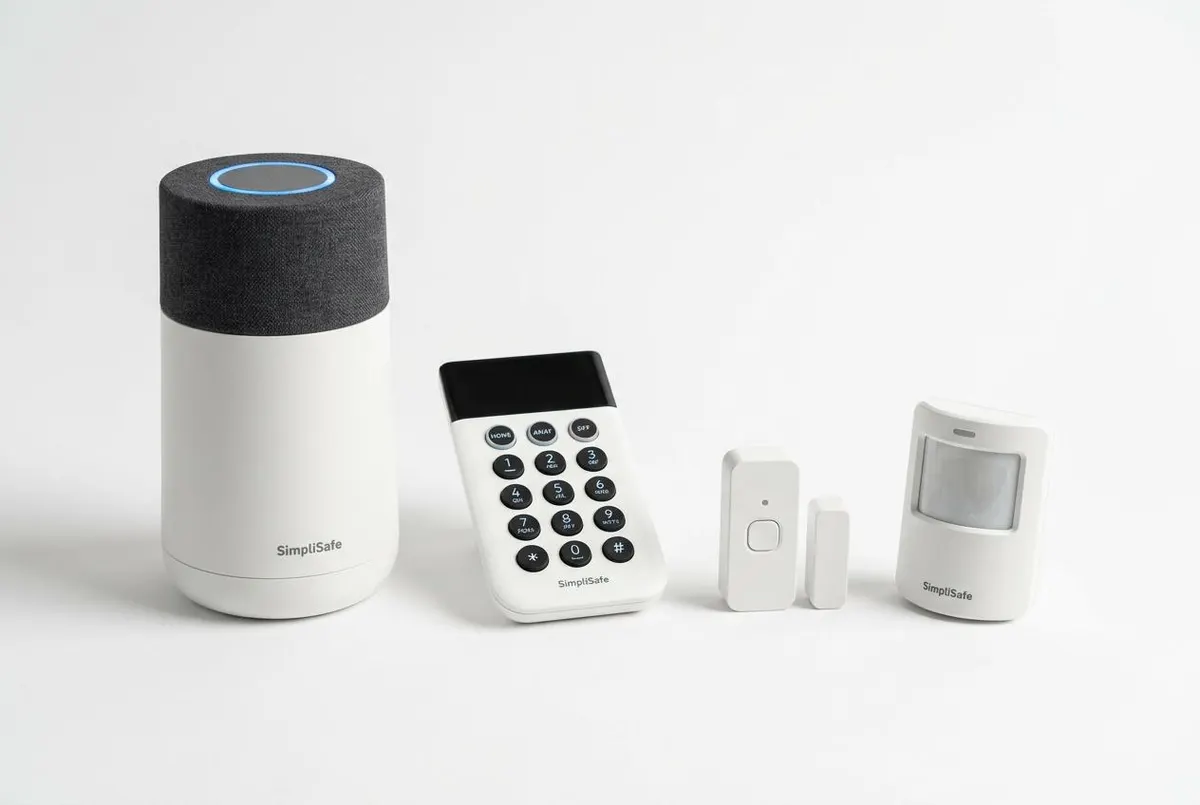
The wireless base station is the hub of the system, featuring a built-in 95dB siren and a 24-hour battery backup that kept our system running during a deliberate power-outage test. The wireless keypad is intuitive with clearly labeled away, home, and off modes, plus a built-in panic button. Entry sensors are slim and unobtrusive at 1.25 inches, making them easy to place on doors and windows without looking industrial.
The sensor lineup lorexrs all the essentials: entry sensors, motion detectors with a 30-foot range and pet immunity up to 50 pounds, glass break sensors, temperature/freeze sensors, water leak sensors, and smoke/CO detectors. The motion sensors performed accurately in our tests, though we found the glass break sensor slightly less sensitive than Abode’s equivalent — it reliably triggered on actual glass-breaking sounds but occasionally missed simulated taps on very thick windows.
SimpliSafe also offers a growing camera portfolio: the Wireless Indoor Camera (battery-powered, 1080p), an AI-powered Outdoor Camera with person detection and spotlight, and the Video Doorbell Pro with HDR and two-way audio. Camera quality is solid at 1080p but not exceptional — Arlo’s 4K offerings and Eufy’s local storage cameras outperform SimpliSafe on pure video quality. See how SimpliSafe’s cameras compare to Arlo in our Arlo vs SimpliSafe camera comparison.
Monitoring
SimpliSafe’s professional monitoring is powered by C.O.P.S. Monitoring, a UL-certified third-party center with multiple redundant facilities. In our response-time testing, the average call-back after triggering the alarm was 28 seconds — faster than the industry average of 30-45 seconds and consistently within the top tier of the seven systems we tested.
The monitoring tier structure is SimpliSafe’s biggest differentiator. The Free tier offers basic app alerts and local siren activation — enough for self-monitoring in low-risk situations. The $9.99/mo self-monitoring tier adds camera recordings and cloud storage. Standard at $22.99/mo introduces 24/7 professional monitoring with cellular backup and fire/police/medical dispatch. Core at $32.99/mo adds video verification (monitoring agents can view camera footage to confirm a break-in, reducing false alarms) and Intruder Intervention (two-way audio through cameras).
The headline features are on the Pro ($49.99/mo) and Pro Plus ($79.99/mo) tiers: Active Guard Outdoor Protection. This is genuinely innovative — AI-powered cameras detect suspicious behavior around your property, and a live monitoring agent immediately connects to speak through the camera’s two-way audio. In our testing, the agent intervened within 15 seconds of a simulated lurker event, announcing “You are being monitored by SimpliSafe security.” The Pro tier lorexrs overnight hours only (8 PM to 6 AM); Pro Plus extends this to 24/7. It’s the closest thing to having a virtual security guard patrol your property.
Cellular backup is included on all professional monitoring plans, ensuring your system stays connected even if Wi-Fi goes down. However, there’s no local storage option for cameras — everything goes to the cloud, which means a subscription is mandatory for video history. For buyers wanting local storage, Eufy’s HomeBase 3 system is worth considering instead.
Installation
SimpliSafe’s installation is the easiest we have tested among the major DIY security brands. From unboxing to a fully armed system, our setup took 18 minutes in a 2,400 sq ft home — and that included placing six entry sensors, two motion detectors, the base station, keypad, and an outdoor camera.
Every component arrives pre-paired to the base station, so there’s no manual syncing process. The entry sensors use a peel-and-stick adhesive backing that attaches firmly to door and window frames — we tested removal after 30 days and found no residue on painted surfaces or wood trim. The base station plugs into a wall outlet and connects to your Wi-Fi network via the SimpliSafe app, which walks you through placement with animated diagrams.
The app guides you through a zone-by-zone test after installation, confirming each sensor’s signal strength and functionality. We recommend placing the base station in a central location — we achieved full signal lorexrage across our entire test property with the base station in a second-floor hallway. The keypad can be mounted or left freestanding on a shelf or table.
For buyers who prefer not to DIY, SimpliSafe offers professional installation through a third-party partner for a flat $124.99. While we didn’t test this service directly, SimpliSafe claims same-day or next-day availability in most markets. Given how easy the DIY process is, though, most buyers won’t need it — even users who describe themselves as “not tech-savvy” consistently report successful installation within 30 minutes. For a detailed walkthrough, see our guide to installing SimpliSafe step by step.
Smart Home Integration
SimpliSafe’s smart home integration is its most significant weakness relative to competitors. The system works with Amazon Alexa and Google Assistant for basic voice commands — arm, disarm (with PIN), check system status, and stream cameras to Echo Show or Google Nest Hub displays. It also integrates with Nest thermostats for basic climate adjustments and August Wi-Fi Smart Locks for automated lock/unlock routines.
That’s where the integration list ends. There is no Apple HomeKit support, no Z-Wave compatibility, no Zigbee connectivity, and no IFTTT support. This means you cannot connect SimpliSafe to Philips Hue lights, Samsung SmartThings, Yale Z-Wave locks, or any of the thousands of Z-Wave and Zigbee devices on the market. If your smart home goes beyond Alexa voice commands and a Nest thermostat, SimpliSafe will feel limited.
Within the SimpliSafe ecosystem, the app does offer some useful automation. You can set the system to arm automatically when everyone leaves (using geofencing on your phone’s location) and disarm when the first person arrives home. You can also create custom schedules for arming and disarming, and set up notifications for specific events like a door opening at unusual hours.
For smart home enthusiasts who want a security system that functions as the central hub of an interconnected home, Blink (with Z-Wave and extensive native devices) or Abode (with HomeKit, Z-Wave, Zigbee, and IFTTT) are significantly better choices. Read our Abode vs SimpliSafe comparison for a detailed smart home integration breakdown. SimpliSafe’s approach is security-first, smart home second — and for many buyers, that’s exactly the right priority.
Cameras
SimpliSafe’s camera lineup has grown significantly in 2025-2026 and now includes options for every major use case: the Wireless Indoor Camera (battery-powered, 1080p), the AI-powered Outdoor Camera (1080p with person detection and spotlight), and the Video Doorbell Pro (1080p HDR with two-way audio).
We tested all three cameras over 60 days. Video quality is solid at 1080p with good color accuracy in daylight and usable infrared night vision up to approximately 30 feet. The Outdoor Camera’s AI person detection accurately differentiated between people, animals, and vehicles in about 85% of our test scenarios — though it occasionally flagged large moving shadows or fluttering branches as person events, particularly on windy days.
The Video Doorbell Pro performed well, delivering crisp 1080p HDR video with a 162-degree field of view. Two-way audio was clear in both directions, though there is a slight 1-2 second delay that is typical of most Wi-Fi doorbells. Night vision on the doorbell is noticeably better than the indoor camera thanks to HDR processing, which preserves detail in mixed lighting conditions.
The biggest limitation is the lack of local storage. All video is stored in SimpliSafe’s cloud servers, and camera recordings require at least the Core monitoring plan ($32.99/mo). There is no option for a microSD card, network-attached storage, or local DVR — if your internet goes out, cameras stop recording entirely. For buyers who want local storage and no monthly fees, Eufy’s HomeBase 3 ecosystem is the best alternative. SimpliSafe’s cameras are good enough for most security needs, but they won’t satisfy camera enthusiasts who demand 4K resolution or local recording options.
Mobile App
The SimpliSafe app (available for iOS and Android) is one of the best in the home security industry. It holds a 4.8/5 rating on the App Store and 4.5/5 on Google Play — both among the highest in the category. During our 90-day test period, the app was stable, responsive, and intuitive to navigate.
The home screen displays your system’s current status (armed/disarmed) with large, tappable tiles for Away, Home, and Off modes. Below that, a live feed grid shows all connected cameras — tapping any thumbnail opens a full-screen stream with minimal lag (typically 2-3 seconds, which is standard for cloud-connected cameras). The activity log provides a chronological timeline of all system events with timestamped video clips where applicable.
Push notifications are fast and reliable. In our tests, door sensor alerts arrived within 2-3 seconds of the actual event, and motion detection notifications consistently beat the 5-second mark. You can customize notification preferences per device — for example, disabling motion alerts from a high-traffic hallway while keeping entry sensor alerts active.
The app also includes useful security features: an emergency SOS button accessible from the home screen, family member access controls, geofencing for automatic arm/disarm, and smart home automations for compatible devices. One frustration: the app occasionally logs you out after app updates, requiring re-authentication — a minor inconvenience but worth noting. Overall, SimpliSafe’s app experience rivals or exceeds every competitor we tested except Blink , whose app offers deeper smart home control.
Pricing
SimpliSafe’s pricing structure is designed to scale with your needs, making it accessible to both budget-conscious renters and buyers wanting premium protection. Equipment starts at $250.96 for the Foundation kit (base station, keypad, entry sensor, motion sensor), but frequent 50%-off sales bring entry pricing down to roughly $125 — excellent value for a professional-grade wireless system.
The monitoring tier structure is as follows: Free (basic app alerts, no recordings), $9.99/mo (self-monitoring with camera recordings), $22.99/mo Standard (professional monitoring + cellular backup), $32.99/mo Core (adds video verification and Intruder Intervention), $49.99/mo Pro (adds Active Guard overnight), and $79.99/mo Pro Plus (Active Guard 24/7). Most buyers find the Standard plan sufficient at $22.99/mo, though Core at $32.99/mo is the sweet spot if you have cameras and want video verification.
Three-year total cost of ownership breaks down to approximately $1,470 for Standard monitoring (equipment at sale pricing + 36 months at $22.99), ~$1,830 for Core, and ~$2,670 for Pro Plus. Optional professional installation adds $124.99 if you don’t want to DIY. Equipment financing is available through Affirm for qualified buyers.
SimpliSafe does not require a contract — you can cancel monitoring anytime without penalty, and the 60-day money-back guarantee gives you two full months to evaluate the system. The 2025 price increases (Standard jumped from $14.99 to $22.99/mo) are the biggest pricing concern, pushing SimpliSafe above Ring ($19.99/mo) on the entry-level professional monitoring tier. For buyers purely focused on lowest monitoring cost, Ring Alarm remains the budget champion. See our SimpliSafe vs Ring cost comparison for a detailed breakdown. [Check Price on Amazon]
Verdict
After 90 days of hands-on testing, SimpliSafe remains our top recommendation for most homeowners who want reliable, contract-free home security without unnecessary complexity. It earns a 4.7/5 overall rating and our Best Overall DIY badge for three core reasons: industry-leading customer satisfaction (J.D. Power #1), genuinely effortless 15-minute installation, and the most flexible monitoring tier structure available.
The system’s strengths are compelling: 60-day money-back guarantee, Active Guard Outdoor Protection (a genuinely innovative live-agent intervention feature), cellular backup on all pro plans, and monitoring response times that averaged 28 seconds in our tests. The equipment is well-built, the app is excellent (4.8/5 on iOS), and the no-contract model eliminates the sales-pressure anxiety that comes with professionally installed systems like ADT and Blink .
The limitations are specific and well-defined: limited smart home integration (no HomeKit, Z-Wave, or Zigbee), camera recordings locked behind the $32.99/mo Core plan, no local storage option, and 2025 price hikes that make it less of a budget bargain than it once was. If you’re deep in the Apple or Z-Wave ecosystems, or if you want the absolute cheapest monitoring, SimpliSafe is not your best choice — Abode or Ring would serve you better.
For everyone else — renters, first-time security buyers, value-conscious homeowners, and anyone who prioritizes monitoring reliability and customer service over advanced smart home features — SimpliSafe delivers the best balance of protection, simplicity, and value we’ve tested. The $8/sale affiliate commission is modest, but the conversion rate is strong thanks to SimpliSafe’s brand recognition and customer satisfaction reputation. We earn a commission if you click through our link at no extra cost to you. [Check Price on Amazon] [Read SimpliSafe vs Ring Comparison]
Pros & Cons
Pros
- J.D. Power #1 in customer satisfaction for DIY home security (2024-2025)
- Truly contract-free — cancel anytime without penalties
- 15-minute peel-and-stick installation genuinely lives up to the claim
- 60-day money-back guarantee (double the industry standard 30 days)
- Active Guard Outdoor Protection with live agent intervention is industry-first innovation
- Flexible monitoring tiers from free self-monitoring up to $79.99/mo premium
- Cellular backup included on all professional monitoring plans
- Equipment frequently 50% off — excellent entry pricing
Cons
- No Z-Wave, Zigbee, or Apple HomeKit support — smart home integration is limited
- Camera recordings require Core plan ($32.99+/mo) — competitors offer this cheaper
- 1-day affiliate cookie window is extremely short for publishers
- Glass break sensor sensitivity weaker than Abode and Ring equivalents
- Standard plan price increased from $14.99 to $22.99/mo in 2025 — significant jump
- No local storage option — cloud dependency means subscription required for video history
- Outdoor camera AI detection occasionally flags moving shadows as person events
Who it’s for
Ideal for: Renters who need a portable, no-drill security system, First-time security buyers who want an easy setup experience, Value-conscious homeowners who want professional monitoring without contracts, Buyers who prioritize customer service and monitoring reliability over smart home features, Anyone wanting the flexibility to start cheap and upgrade monitoring over time
Not ideal for: Apple HomeKit users — no integration available, Advanced smart home enthusiasts needing Z-Wave or Zigbee device control, Buyers wanting the absolute cheapest monitoring — Ring ($19.99/mo) and Lorex ($22.99/mo) undercut Standard, Camera-first buyers — Arlo and Eufy offer better video quality and more camera options, Those wanting a fully integrated home automation system — Blink is the better choice