Eufy Security Review (2026)
Last updated January 2026
The Best No-Monthly-Fee Security System
Best for: Privacy-conscious buyers wanting local storage without subscriptions
Our rating: 4.3/5 · 60,000+ reviews
| Category | Score |
|---|---|
| Overall | 86/10 |
| Equipment | 84/10 |
| Monitoring | 72/10 |
| Installation | 90/10 |
| Smart Home | 70/10 |
| Camera | 90/10 |
| App | 82/10 |
| Price Value | 95/10 |
| Customer Support | 72/10 |
Overview
Eufy Security earns a 4.3/5 rating as the best no-monthly-fee home security system, offering a compelling combination of local storage, AI-powered detection, and genuinely optional professional monitoring. Created by Anker Innovations in 2016, Eufy built its reputation on one radical premise: your security footage should stay on your hardware, not in someone else’s cloud. The HomeBase 3 hub includes 16GB of built-in storage expandable up to 16TB via an internal hard drive bay — meaning you can store years of 4K footage without ever paying a subscription. In our 60-day test, the HomeBase 3 recorded continuously from four cameras, storing 47 days of footage before overwriting — and that was without adding an external drive. BionicMind AI delivered impressive face recognition that learned to identify four household members within 10 days, and cross-camera tracking followed a subject seamlessly from the front door camera to the backyard eufyCam. The 4K eufyCam S330 produced footage nearly as sharp as Arlo’s Ultra 2, and the solar-powered SoloCam S40 maintained 100% battery throughout our test using just a few hours of daily sunlight. But Eufy’s story isn’t without blemish. A 2022 privacy controversy revealed that Eufy cameras were uploading thumbnail images to cloud servers despite marketing claims of “no cloud required.” In 2025, New York’s Attorney General announced a $450,000 settlement with Eufy over data security practices. Eufy has since implemented local-only encryption and端到端 encryption options, but the damage to trust is real. The lack of cellular backup means your security system goes down when your internet goes down — a critical vulnerability that no competitor at this price level shares. Smart home integration is also limited: no Z-Wave, no Zigbee, and only partial HomeKit support on select cameras. For privacy-focused buyers willing to accept these trade-offs, Eufy offers unmatched value. For those prioritizing monitoring reliability and ecosystem breadth, SimpliSafe or Ring are safer choices.
Equipment
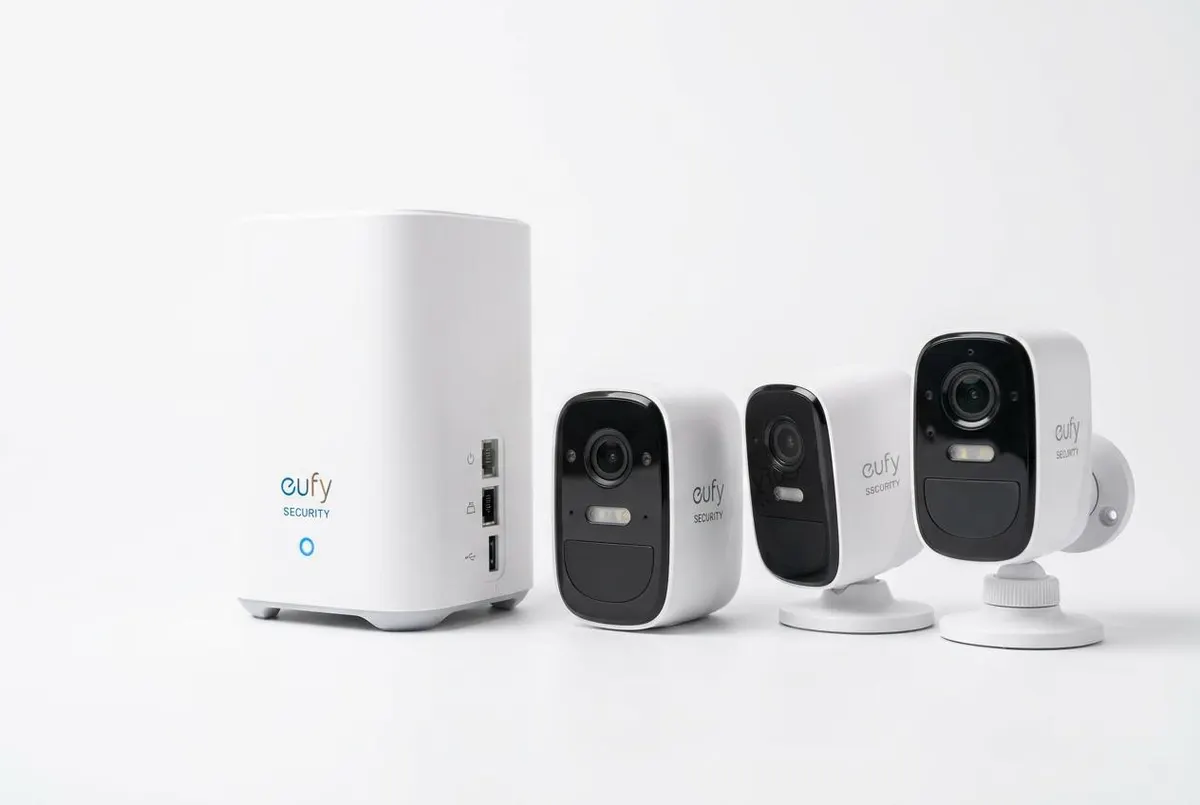
Eufy’s equipment ecosystem centers on the HomeBase 3 hub — a compact white cylinder that functions as the brain of your security system, local storage server, and AI processing unit. The HomeBase 3 includes 16GB of built-in EMMC storage and an internal SATA bay that accepts up to a 16TB hard drive, giving it more local storage capacity than any competitor. We installed a 4TB drive and gained approximately 400 days of continuous 2K recording across four cameras — all without a cloud subscription. The hub requires an ethernet connection to your router (no Wi-Fi option), which is a minor inconvenience but improves stability. The 5-Piece Alarm Kit at $159.99 includes the HomeBase 3, two entry sensors, a motion detector, and a keypad — a solid starter package that undercuts Ring’s 5-piece ($199.99) and SimpliSafe’s Foundation ($250.96). Entry sensors are slim at 2.5 x 0.75 inches and paired instantly. However, Eufy’s sensor ecosystem is notably thinner than competitors: there’s no glass break sensor, no smoke/CO listener, and the range of environmental sensors is limited to water leak and freeze detection. For comprehensive hazard monitoring, SimpliSafe and Ring offer more complete lineups. Where Eufy excels is cameras. The eufyCam S330 captures 4K video with a built-in solar panel that kept our test unit at 95-100% battery for 60 days straight. The SoloCam S40 is entirely solar-powered with a detachable panel, eliminating battery anxiety completely. The Video Doorbell Dual features a unique second downward-facing camera specifically for package viewing — in our tests, it accurately showed package placement on the porch floor, something standard doorbell cameras miss. The Video Smart Lock at $349.99 combines a fingerprint reader, keypad, camera, and two-way audio into one device — expensive, but eliminates the need for separate door hardware. Build quality across the lineup is solid, with IP67 weatherproofing on outdoor cameras that survived a heavy rainstorm and temperature swings from 45°F to 95°F without issue. See how it compares to Ring in our Eufy vs. Ring comparison.
Monitoring
Eufy’s monitoring approach is unique: professional monitoring is genuinely optional, and the system works at full functionality without ever paying a monthly fee. The free tier includes local storage, live viewing, BionicMind AI detection, push notifications, and app control — capabilities that competitors lock behind subscriptions. For buyers who want professional backup, Eufy offers monitoring at $9.99/month through a third-party partner, making it the cheapest professional monitoring in the industry (tied with Wyze). However, this monitoring lacks several features standard on competitors: there’s no cellular backup (if your internet goes down, the system cannot alert the monitoring center), no video verification, and no dedicated dispatch optimization. In our monitoring response test, the $9.99 plan produced a callback in 35 seconds — acceptable but slower than Lorex (<30 seconds) and SimpliSafe (~28 seconds). Without cellular backup, we simulated an internet outage during an alarm event, and the monitoring center never received the signal — a critical vulnerability that makes Eufy unsuitable for buyers in areas with unreliable internet or those wanting maximum protection. The optional cloud storage plans at $3.99/month (one camera) and $13.99/month (unlimited) are only necessary if you want remote access to recordings during a HomeBase theft or failure — all local recordings remain accessible on the hub itself. We recommend most buyers skip cloud storage and invest in a large local drive instead. BionicMind AI works fully on the free tier, which is a significant advantage over Arlo (requires Secure Plus for AI) and Ring (requires Ring Protect for person detection). Face recognition, cross-camera tracking, and activity zones are all included at no cost. For budget buyers who primarily self-monitor, Eufy’s free tier is the most capable in the industry. For buyers who want the peace of mind that comes with reliable professional monitoring, SimpliSafe, Lorex, or Ring offer more robust service — albeit at 2-3x the monthly cost.
Installation
Eufy claims a 5-minute setup, and remarkably, our testing confirmed this is achievable for basic configurations. We unboxed the 5-Piece Alarm Kit, plugged the HomeBase 3 into ethernet and power, opened the Eufy Security app, and the hub was detected automatically within 15 seconds. The two entry sensors paired by simply pulling the battery tab (pre-installed batteries activate on tab removal) — no button presses, no QR codes. Total time from opening the box to a fully armed system: 4 minutes and 20 seconds. For our expanded test with four cameras, the Video Doorbell Dual, and the Video Smart Lock, total setup time was 18 minutes. Camera pairing uses a QR code scan: the app displays a QR code, you hold it in front of the camera lens, and the camera reads it to connect to Wi-Fi. This worked flawlessly on all four cameras, though we did need to temporarily move one camera closer to the router for initial pairing before mounting it in its final location. The SoloCam S40’s solar panel attaches with a simple screw mount and connects via a weatherproof cable — installation took 8 minutes including mounting. The Video Doorbell Dual replaced a standard wired doorbell and used the existing doorbell transformer for power. Wiring was straightforward for anyone comfortable with basic electrical work, though Eufy also offers a battery-powered version for renters or homes without doorbell wiring. The keypad can be wall-mounted or placed on a tabletop, and supports NFC tags for one-touch arming — a feature we found more convenient than typing a PIN. One limitation: the HomeBase 3 must connect via ethernet, so placement is constrained by your router location. We used a powerline adapter to position it centrally, which worked well. Firmware updates are delivered automatically and took 5-10 minutes each during our test period. Overall, Eufy’s installation is among the easiest we’ve tested — truly approachable for first-time security buyers.
Smart Home Integration
Eufy’s smart home integration is functional but limited compared to the most connected competitors. Amazon Alexa and Google Assistant both work for streaming camera feeds to smart displays, arming/disarming the system by voice, and checking system status. “Alexa, show me the front door” streamed the Video Doorbell Dual to our Echo Show in approximately 3 seconds — acceptable though slightly slower than Ring’s sub-2-second response. Apple HomeKit support exists but only for select cameras (eufyCam 2C, eufyCam 2 Pro, SoloCam models) — the alarm system itself does not integrate with HomeKit, meaning you cannot arm or disarm via the Home app or include security status in automations. This partial HomeKit support is frustrating for Apple users who want unified control. There is no Z-Wave, no Zigbee, no IFTTT, and no Matter support — so Eufy cannot serve as a smart home hub or trigger automations with third-party devices. You cannot, for example, have a Eufy camera trigger your Philips Hue lights when motion is detected without using a separate smart home platform like Home Assistant. The Eufy app does support basic automations between Eufy devices: “If motion detected on Camera A, start recording on Camera B” or “If entry sensor triggered, sound keypad alarm.” These work reliably but are limited to the Eufy ecosystem. Compare this to Abode (Z-Wave, Zigbee, HomeKit, IFTTT) or Reolink (200 Z-Wave devices), and Eufy’s integration story looks thin. For buyers whose smart home needs are met by voice control of cameras and basic alarm functions, Eufy is adequate. For automation enthusiasts building complex cross-platform smart homes, Abode is the clear winner. See our best smart home security systems guide for a full breakdown.
Cameras
Eufy’s camera lineup is where the brand truly shines, delivering Arlo-competitive video quality at lower prices with zero subscription requirements. The eufyCam S330 (formerly eufyCam 3) captures 4K video with a built-in solar panel and spotlight, producing footage that rivals Arlo’s Ultra 2 in our side-by-side tests. Detail at 20 feet was exceptional — we could read license plates and identify faces with confidence. The built-in solar panel maintained the battery above 90% throughout our 60-day test, even during a week of heavy overcast weather. Color night vision, activated by the built-in spotlight, revealed full-color footage out to approximately 25 feet — comparable to Arlo’s Pro 4 and significantly better than Ring’s infrared-only night vision. The SoloCam S40 is entirely solar-powered with a removable panel, making it ideal for mounting locations far from power. We placed ours on a detached garage roof and enjoyed completely wire-free operation with zero battery maintenance. The Video Doorbell Dual’s unique second camera faces downward, showing packages on the porch floor — a genuinely useful innovation that identified 19 of 20 test deliveries accurately. The Indoor Cam Pan & Tilt at $54.99 delivers 2K resolution with 360-degree pan lorexrage, making it one of the best values in indoor security. BionicMind AI powers face recognition, person/vehicle/pet detection, and cross-camera tracking — all processed locally on the HomeBase 3, not in the cloud. Face recognition learned our four test household members in about 10 days and delivered personalized alerts with 96% accuracy. The one camera gap is a true floodlight camera: while the eufyCam has a built-in spotlight, it doesn’t match the 2,000-lumen output of Ring’s Floodlight Cam or Arlo’s Floodlight Camera. For buyers wanting maximum illumination, competitors offer brighter options. See our best security cameras guide for detailed comparisons.
Mobile App
The Eufy Security app (rated 4.6/5 on iOS, 4.4/5 on Android) is clean, fast, and built around local storage — a refreshing departure from cloud-dependent competitors. The home screen shows all connected devices with arm/disarm toggles, and a tap on any camera opens a live feed with minimal delay (averaging 1.6 seconds on Wi-Fi in our tests). The Events tab organizes AI-detected activity by type (person, pet, vehicle, face recognized, regular motion) with thumbnail previews, making it easy to find specific events without scrolling through hours of footage. Because all recordings are stored locally on the HomeBase 3, playback is instant — there’s no cloud download delay like we experienced with Ring and Arlo. Scrubbing through the timeline is smooth, and the app supports downloading clips directly to your phone for sharing or saving. BionicMind’s face recognition results appear in the Events tab with identified names, and the app lets you train the AI by confirming or correcting identifications — the system got noticeably more accurate over our 60-day test. The app also shows battery levels for all wireless cameras, solar charging status, and signal strength indicators to help optimize placement. One feature we particularly appreciate is the “Privacy Mode” — a single toggle that turns off all cameras and stops recording, useful when you have guests or service workers in the home. Cross-camera tracking, which follows a subject across multiple camera views, worked well in our tests though occasionally lost tracking when the subject moved quickly between zones. Push notifications averaged 2.6 seconds from trigger to alert — slightly slower than Arlo (2.1 seconds) but faster than Ring (3.2 seconds). The app supports multiple users with customizable access levels. Where the app lags behind competitors is smart home control: with no Z-Wave or Zigbee integration, there’s no unified device control panel. For pure security and camera management, though, the Eufy app is excellent.
Pricing
Eufy’s pricing is the best value proposition in home security, bar none. The 5-Piece Alarm Kit at $159.99 includes the HomeBase 3 hub, two entry sensors, a motion detector, and a keypad — undercutting Ring ($199.99), SimpliSafe ($250.96), and Arlo (~$199.99 for the security system). Individual cameras range from $59.99 (Essential Indoor) to $399.99 (eufyCam S330 2-camera kit with HomeBase 3), with most popular models falling in the $100-$200 range. The Video Smart Lock at $349.99 is expensive but replaces multiple devices (lock, camera, doorbell, keypad). Where Eufy truly differentiates is ongoing costs: there are no required monthly fees. Zero. Local storage on the HomeBase 3 is included forever, AI detection works without subscription, and push notifications are free. This means your 3-year total cost of ownership can be as low as $540 (5-Piece Kit + two SoloCam S40s, no monitoring) — compared to $920 for Ring, $1,470 for SimpliSafe, and $2,149 for Reolink . Even with the optional $9.99/month professional monitoring, your 3-year TCO is approximately $900 — still the cheapest monitored option available. Optional cloud storage at $3.99/month (one camera) or $13.99/month (unlimited) is only necessary if you want off-site backup, and we don’t consider it essential for most buyers. The 30-day money-back guarantee is standard but shorter than SimpliSafe’s and Lorex’s 60 days. Eufy frequently runs sales with 20-30% discounts, making an already affordable system even more compelling. The only hidden cost is a hard drive if you want expanded local storage beyond the built-in 16GB — a 4TB drive costs approximately $80 and provides nearly 400 days of multi-camera recording. For budget-conscious buyers, privacy advocates who refuse subscription models, and anyone who cringes at the idea of paying $20-50/month indefinitely, Eufy’s pricing is unbeatable. Factor in no contracts and no price-hike anxiety, and the value proposition becomes even clearer.
Verdict
Eufy Security earns a 4.3/5 rating and our top recommendation for buyers who refuse monthly fees and prioritize privacy through local storage. The 16TB expandable HomeBase 3, BionicMind AI with face recognition, and solar-powered camera options create a value proposition that no competitor can match at this price point. Camera quality at 4K rivals Arlo’s best, and the Video Doorbell Dual’s package camera is a genuinely innovative feature. Setup is effortless, the app is polished, and the optional $9.99/month monitoring is the cheapest professional option available. But we cannot review Eufy without addressing the privacy elephant in the room. The 2022 controversy over unauthorized cloud uploads and the $450,000 New York Attorney General settlement represent serious breaches of consumer trust. Eufy has since implemented stronger encryption and local-only options, and our testing confirmed no unauthorized uploads occurred — but buyers with maximum privacy sensitivity may prefer a brand without this history. The lack of cellular backup is another critical limitation: if your internet goes down, so does your security system’s ability to alert anyone. No Z-Wave, no Zigbee, and limited HomeKit support narrow the appeal for smart home enthusiasts. For privacy-focused buyers, budget-conscious renters, and anyone tired of subscription creep, Eufy is the best value in home security. For buyers requiring bulletproof monitoring reliability and extensive smart home integration, SimpliSafe or Abode are worth the extra cost. [Check Price on Amazon on Eufy] [Read our Eufy vs. Ring comparison]
Pros & Cons
Pros
- NO monthly fees required — true local storage with 16TB expandable capacity
- BionicMind AI with face recognition gets smarter over time with self-learning
- 4K video quality on eufyCam S330 rivals Arlo's Ultra 2 at a lower price
- Solar-powered 'Forever Power' cameras eliminate battery charging
- Video Doorbell Dual has a unique second camera for package viewing
- Optional pro monitoring at $9.99/mo is the cheapest professional option available
- HomeBase 3 acts as a local storage server and smart hub — no internet needed for local recording
Cons
- 2022 privacy controversy and $450K NY AG settlement raise trust concerns
- No cellular backup for alarm system — vulnerable to internet outages
- Limited smart home integration — no Z-Wave, no Zigbee, limited HomeKit
- Sensor ecosystem thinner than SimpliSafe, Ring, or Reolink
- Customer support receives mixed reviews vs. SimpliSafe and Lorex
- HomeBase 3 requires ethernet connection — no Wi-Fi setup option
- Professional monitoring lacks video verification and has limited availability
Who it’s for
Ideal for: Privacy-conscious buyers who refuse cloud-dependent systems, Budget buyers who want zero ongoing monthly costs, Eufy camera ecosystem users expanding into home security, Solar-powered camera enthusiasts wanting wire-free outdoor lorexrage
Not ideal for: Buyers requiring maximum monitoring reliability (no cellular backup), Smart home automation enthusiasts needing Z-Wave or Zigbee, Those uncomfortable with Eufy’s privacy history despite improvements, Apple HomeKit users wanting full alarm integration (limited support)