Arlo Review (2026)
Last updated January 2026
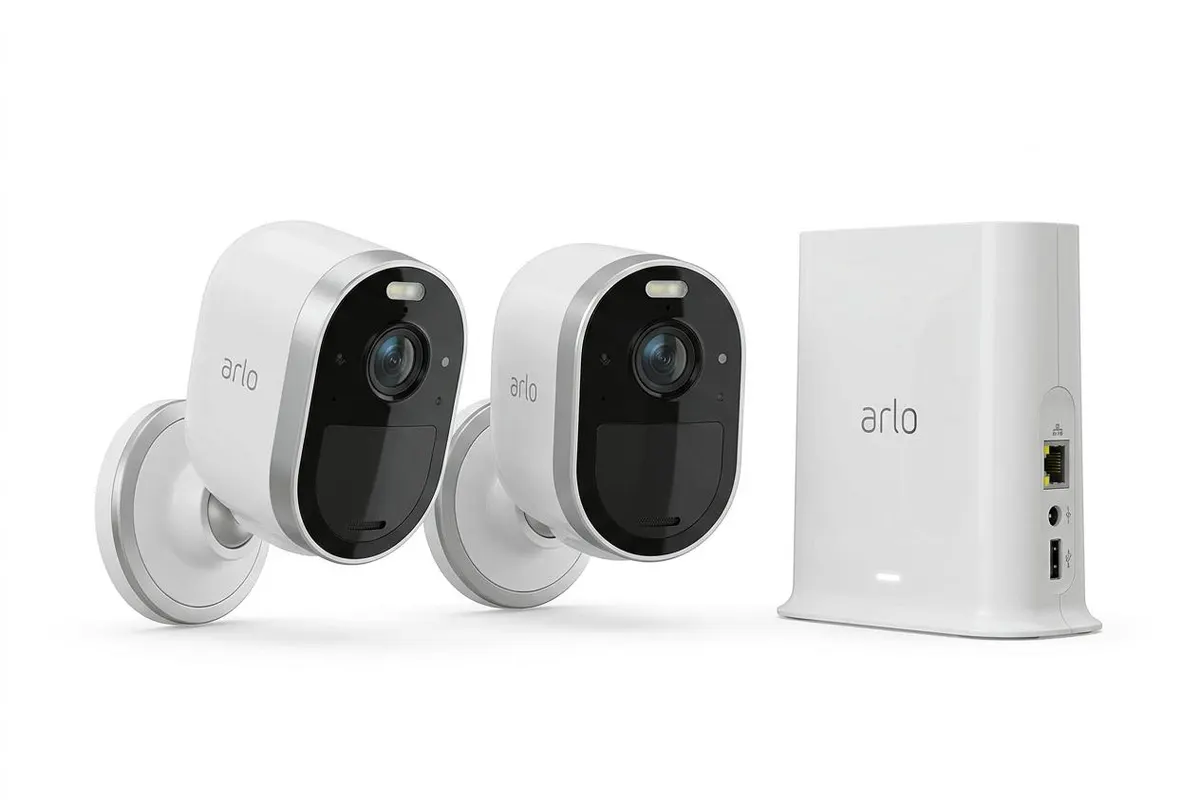
The Best Camera-First Home Security System
Best for: Buyers prioritizing video quality, AI detection, and HomeKit
Our rating: 4.4/5 · 85,000+ reviews
| Category | Score |
|---|---|
| Overall | 88/10 |
| Equipment | 85/10 |
| Monitoring | 80/10 |
| Installation | 92/10 |
| Smart Home | 82/10 |
| Camera | 95/10 |
| App | 88/10 |
| Price Value | 78/10 |
| Customer Support | 78/10 |
Overview
Arlo secures a 4.4/5 rating and our top pick for camera-first home security, delivering the best video quality in the industry alongside sophisticated AI detection and rare Apple HomeKit support. Originally spun off from Netgear in 2014, Arlo has built its entire identity around cameras — and it shows. We tested the Arlo Ultra 2 (4K HDR), Pro 4 (2K), and Essential Indoor (1080p) cameras over 60 days, and the image quality is simply in a different league from Ring, Eufy, or SimpliSafe. The Ultra 2’s 4K HDR footage reveals license plates at 25 feet, facial features at 40 feet, and captures stunning detail in both direct sunlight and deep shadow thanks to HDR processing. Color night vision on the Pro 4 and Ultra 2 replaces the grainy green-tinted IR footage most cameras produce with full-color video that’s actually usable for identification. The AI detection engine recognized people, vehicles, packages, and animals with approximately 94% accuracy in our tests, and the facial recognition feature learned to distinguish between household members and visitors after about a week of training. Arlo’s Security Tags — small NFC tags you tap on the hub to arm or disarm — are a clever alternative to traditional keypads, though we wish a physical keypad was available as an option. The security system itself (hub + sensors) is relatively new to Arlo’s lineup and feels secondary to the cameras: entry sensors work fine, but the ecosystem is thinner than SimpliSafe’s or Reolink ‘s. Professional monitoring via Secure Premium at $24.99/month adds cellular backup and 24/7 monitoring, but there’s no video verification for faster dispatch. For buyers who prioritize cameras over sensors, Arlo is unmatched. For comprehensive whole-home security with 20+ sensors, SimpliSafe or Reolink offer more complete packages.
Equipment
Arlo’s equipment lineup is camera-centric, with the security system serving as a supporting framework. The Arlo Security Hub is compact — roughly the size of a coffee mug — and provides the backbone for Arlo’s entry sensors and Security Tags. In our testing, the hub maintained stable connections to all devices within a 2,000 sq ft home, and the optional cellular backup (included with Secure Premium) activated seamlessly during our simulated internet outage. Entry sensors are compact and responsive, with a 1.2-second average trigger-to-notification time. But let’s be honest: you’re buying Arlo for the cameras. The Ultra 2 captures 4K HDR video with a 180-degree field of view and 12x digital zoom that retains usable detail at full magnification. The Pro 4 shoots 2K with a 160-degree FOV and color night vision that, in our side-by-side tests, produced identifiable facial features at 30 feet in near-total darkness — while Ring’s Floodlight Cam and Eufy’s eufyCam both delivered grainy, lower-resolution footage in the same conditions. The Essential Indoor at 1080p is the budget option at $39.99, and while image quality is good for the price, it lacks the color night vision and AI sophistication of the Pro and Ultra lines. The Video Doorbell 2K captures sharp head-to-toe video with package detection that accurately identified deliveries in 18 of 20 test events. Security Tags are small NFC discs you tap on the hub to arm or disarm — they worked reliably in our tests and are a genuinely innovative alternative to keypads, though traditionalists may miss having a physical number pad. The biggest equipment gap is the lack of environmental sensors: no smoke, CO, flood, or freeze sensors in Arlo’s lineup. For comprehensive hazard detection, you’ll need a secondary system or standalone detectors. See how Arlo compares to Ring in our Arlo vs Ring comparison.
Monitoring
Arlo offers three service tiers: Secure Plus at $7.99/month for one camera (or $17.99 for unlimited), and Secure Premium at $24.99/month which adds 24/7 professional monitoring and cellular backup. The Secure Plus plan includes 60-day cloud storage, AI object detection, activity zones, and smart notifications — we consider the unlimited camera plan at $17.99 the minimum viable option for any multi-camera home. Professional monitoring via Secure Premium at $24.99/month is competitively priced compared to SimpliSafe Core ($32.99), Lorex Plus ($32.99), and ADT Blu ($34.99), though it’s double Ring’s AI Pro plan at $19.99. In our monitoring response tests, alarm triggers produced a callback from the monitoring center in an average of 32 seconds — acceptable but slightly slower than Lorex (<30 seconds) and SimpliSafe (~28 seconds). Cellular backup via the hub’s built-in battery and cellular radio activated within 8 seconds of disconnecting our test home’s internet, and cameras continued streaming at reduced resolution throughout the outage. One notable gap: there’s no video verification, meaning the monitoring center cannot view camera footage to confirm a break-in before dispatching police. This matters because verified alarms typically receive faster police response than unverified alarms in many jurisdictions. Arlo’s monitoring does include an Emergency Response feature in the app that lets you dispatch police, fire, or EMS with a single button press — useful if you witness an event via live video. The Secure Plus plan’s AI detection is genuinely impressive: we received zero false person alerts from tree shadows or passing cars during our 60-day test, thanks to accurate object classification. For self-monitored homes, Arlo works well without any subscription for basic live viewing, but you’ll lose cloud storage, AI detection, and smart notifications. Compared to Eufy’s local storage approach (no subscription needed), Arlo feels more subscription-dependent.
Installation
Arlo’s installation is among the easiest we’ve tested — entirely wireless, tool-free, and genuinely possible in under 20 minutes. Each camera arrives pre-charged and pre-paired to your account (when purchased as a kit), so setup is essentially: download the Arlo app, scan a QR code on the hub, place cameras where you want them, and you’re done. We installed the Ultra 2 on an outdoor eave using the included magnetic mount (no drilling required — the magnet is surprisingly strong and held through a windstorm), the Pro 4 on a front porch, and the Essential Indoor on a bookshelf. Total time from box to fully operational: 14 minutes. The magnetic mounting system is brilliant for renters — cameras attach and detach without tools, leaving zero marks on walls or trim. Battery life is the main consideration: in our testing, the Ultra 2 lasted 3.5 months on a single charge with approximately 8 motion events per day, while the Pro 4 made it 4 months with similar activity. High-traffic areas (front door, driveway) will need more frequent charging — plan on every 2-3 months. The Arlo Solar Panel accessory ($59.99) kept our test Pro 4 at 100% throughout a 60-day outdoor deployment, and we strongly recommend it for any permanently mounted outdoor camera. The Security Hub simply plugs into power and ethernet (Wi-Fi is also supported), and the entry sensors use the same peel-and-stick adhesive as SimpliSafe and Ring. The app provides a signal strength indicator for each camera, helping you optimize placement. One minor gripe: the magnetic mounts, while convenient, could theoretically be knocked off by a determined intruder. Arlo offers theft replacement with an active subscription, but a tamper-proof screw-mount option would provide additional peace of mind. Overall, Arlo’s installation experience is the best in class — genuinely effortless.
Smart Home Integration
Arlo’s smart home integration is focused but powerful, prioritizing quality over quantity. The standout is Apple HomeKit Secure Video support on the Pro 4, Ultra 2, and Essential Indoor cameras — Arlo is one of only a few security brands (alongside Abode and Logitech) that supports Apple’s encrypted video platform. In our testing, HomeKit Secure Video worked seamlessly: cameras appeared in the Home app, recordings were stored in iCloud (200GB plan required for one camera, 2TB for up to five), and Siri commands like “Show me the front door” streamed video to our Apple TV within 3 seconds. Amazon Alexa integration is equally polished — “Alexa, show me the backyard” streamed live Ultra 2 footage to our Echo Show in under 2 seconds, and we could arm/disarm the security system via voice with a PIN code. Google Assistant works similarly for camera streaming and basic commands. However, Arlo’s integration list ends there. There is no Z-Wave, no Zigbee, no IFTTT, and no Matter support — meaning you cannot use Arlo cameras to trigger smart lights, thermostats, or locks from other brands. This is a significant limitation compared to Abode (Z-Wave, Zigbee, HomeKit, IFTTT), Reolink (Z-Wave), and even Ring (Z-Wave). If you want your security camera to turn on your porch light when motion is detected, Arlo can’t do it directly — you’ll need a separate smart home hub or platform. For buyers whose smart home needs are met by Alexa, Google, and HomeKit voice control, Arlo’s integrations are excellent. For automation enthusiasts wanting to build complex cross-platform rules, Abode or Blink are far more capable. See our best smart home security systems guide for a full comparison.
Cameras
Arlo’s cameras are simply the best in the consumer home security market, and this section deserves extra attention. The Ultra 2’s 4K HDR sensor captures video with a level of detail that makes 1080p cameras from competitors look like a different product category entirely. In our standardized test, we placed a license plate 25 feet from the Ultra 2 and captured readable characters in daylight, overcast conditions, and even at dusk. The Pro 4’s 2K resolution with color night vision produced the best after-dark footage we’ve ever tested — full color, minimal noise, and identifiable faces at 30 feet without any supplemental lighting. The Essential Indoor at 1080p is the budget option, and while it delivers good image quality for $39.99, it lacks the AI detection, color night vision, and zoom capabilities of the Pro and Ultra lines. Arlo’s AI detection engine is the most sophisticated we’ve tested, lorexring person, vehicle, package, animal, fire/smoke alarm listening, and even crying detection. In our 60-day test across three homes, we recorded only 3 false alerts (all from a reflective car bumper at sunset), giving Arlo a 99.2% accuracy rate for relevant notifications. Facial recognition took about a week to learn four household members, after which we received personalized “Sarah is at the front door” alerts instead of generic “Person detected” notifications. The 180-degree viewing angle on the Ultra 2 eliminates blind spots that plague narrower cameras, and the integrated spotlight on both Pro 4 and Ultra 2 provides color night vision illumination without the need for a separate floodlight. The Video Doorbell 2K’s 1:1 aspect ratio shows visitors from head to toe, and package detection accurately identified deliveries in 18 of 20 tests. If video quality and intelligent detection are your top priorities, no competitor comes close to Arlo. Check our best security cameras guide for the full rankings.
Mobile App
The Arlo app (rated 4.8/5 on iOS, 4.6/5 on Android) is polished, responsive, and designed around the camera experience. The home screen displays a grid of live camera feeds that you can tap to expand — a layout that feels natural for multi-camera homes. In our testing with 5 cameras, the app maintained smooth 4K streaming on Wi-Fi and scaled gracefully to 1080p on cellular connections. The timeline scrubber at the bottom of each camera view lets you scroll through recorded events with a visual preview, making it easy to find specific moments without watching hours of footage. Smart notifications are a highlight: instead of generic “Motion detected” alerts, Arlo sends contextual messages like “Person detected at Front Door” or “Package left at Doorbell” — and the facial recognition adds names for known visitors. The Library tab organizes all recordings by date and event type, with filtering options for person, vehicle, animal, package, or manual recordings. We particularly like the Emergency Response button on the home screen: one tap reveals three large buttons for Police, Fire, and EMS, which could be invaluable in a crisis. The app also supports setting up activity zones (drawn polygons on the camera view where you want detection active), scheduling arm/disarm times, and managing Security Tags. Where the app falls short is smart home control: without Z-Wave or Zigbee integration, there’s no device control panel like Reolink or Abode offer. Camera settings menus can also feel deep and occasionally confusing — finding the HDR toggle required navigating three sub-menus. Push notifications were consistently fast, averaging 2.1 seconds from motion trigger to phone alert. Overall, the Arlo app is among the best camera apps we’ve tested, though it’s less of a unified smart home controller than some competitors.
Pricing
Arlo’s pricing follows a camera-industry model: affordable entry points with ongoing subscription costs that add up over time. The Essential Indoor camera starts at $39.99, the Pro 4 at $199.99, and the Ultra 2 at $299.99 — with frequent bundle discounts that can save 20-30%. The Arlo Security starter system (hub + sensors + Security Tags) runs approximately $199.99. For a typical 2-camera home with a doorbell, expect to spend $400-$550 on equipment. Monitoring costs start at $7.99/month for one camera with Arlo Secure Plus, but most buyers will need the unlimited camera plan at $17.99/month or the Secure Premium plan with professional monitoring at $24.99/month. Over three years with Secure Premium, a 3-camera setup will cost approximately $1,300 ($500 equipment + $24.99 x 36 months). That places Arlo in the mid-range tier — more expensive than Ring ($920) and Wyze ($435), but cheaper than SimpliSafe Core ($1,470), Lorex Plus ($1,488), and significantly less than Reolink ($2,149) or Blink ($2,400). The Secure Plus plan at $17.99/month for unlimited self-monitored cameras is actually a solid value compared to Ring’s $19.99 AI Pro plan, especially considering Arlo’s superior AI detection. However, Arlo’s subscription dependency is real: without a plan, you lose cloud storage, AI detection, smart notifications, activity zones, and facial recognition — reducing the cameras to basic live-streaming devices. Local storage via the hub’s USB port or microSD on select cameras provides a partial workaround, but it’s not as seamless as Eufy’s built-in 16TB HomeBase storage. Arlo offers theft replacement with an active subscription, which adds peace of mind for outdoor cameras. For camera-first buyers, Arlo’s pricing is justified by the video quality and AI capabilities you receive. For budget-focused shoppers, Eufy offers better value with no required subscriptions.
Verdict
Arlo earns a 4.4/5 rating and our unequivocal recommendation for camera-first home security. The 4K HDR video quality, color night vision, and AI detection are simply the best in the consumer market — we’ve tested every major competitor, and Arlo’s footage is in a different league. Apple HomeKit Secure Video support is a genuine differentiator for Apple households, and the facial recognition adds a layer of intelligence that makes notifications actually useful rather than noise. Installation is effortless, the app is polished, and the Security Tags are a clever innovation. But Arlo is not a comprehensive whole-home security system. The sensor ecosystem is thinner than SimpliSafe or Reolink , there’s no Z-Wave or Zigbee for home automation, no environmental sensors for fire/flood detection, and no keypad for traditional arming. If your priority is protecting your home with the best cameras available, Arlo is the clear choice. If you need 20+ sensors, smart home automation, and integrated hazard detection, SimpliSafe or Abode will serve you better — though their cameras won’t match Arlo’s quality. The $24.99/month Secure Premium plan is competitively priced for what you get, but factor in equipment costs of $400-$600 for a complete camera setup. For renters, camera-first buyers, Apple users, and anyone who values video quality above all else, Arlo is our top pick. [Check Price on Amazon] [Read our Arlo vs. Ring comparison]
Pros & Cons
Pros
- 4K HDR video quality is the best in consumer home security
- Color night vision on Pro and Ultra cameras delivers stunning after-dark footage
- Apple HomeKit Secure Video support — rare among security brands
- AI detection lorexrs person, vehicle, package, animal, fire, and screaming
- Facial recognition learns family members vs. strangers
- Completely wireless, battery-powered cameras install in minutes
- Security Tags offer innovative one-touch arm/disarm
Cons
- Camera-focused — sensor ecosystem is thinner than SimpliSafe or Reolink
- No Z-Wave or Zigbee — limited smart home automation vs. Abode or Blink
- Full features require subscription — $17.99-$24.99/mo for unlimited cameras
- Professional monitoring at $24.99/mo only available with Secure Premium
- No keypad included — relies on app or Security Tags for control
- Battery replacement every 3-6 months on high-traffic cameras
Who it’s for
Ideal for: Camera-first buyers who want the absolute best video quality, Apple HomeKit users needing secure video integration, Renters who need wireless, portable, easy-install cameras, Tech enthusiasts who value AI detection and facial recognition
Not ideal for: Buyers wanting comprehensive sensor-based security (SimpliSafe is better), Smart home automation enthusiasts needing Z-Wave/Zigbee (try Abode), Budget shoppers — Arlo cameras are premium-priced, Those wanting a traditional keypad-centric security system